


Dental Shooting
1.76.00 Reviews
App Specs
- Version
- 2.9.10
- Updated On
- License
- Free
- Downloads
- 10,000+
- Developer
- Dental Shooting SRLs
- Categories
- Medical
- Platform
- Android
Screenshots
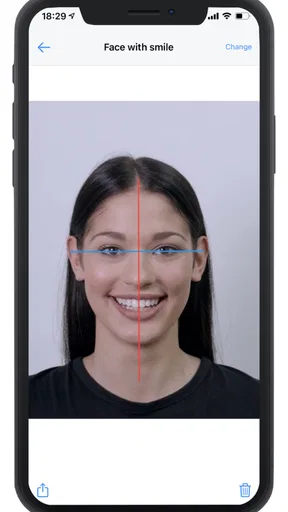
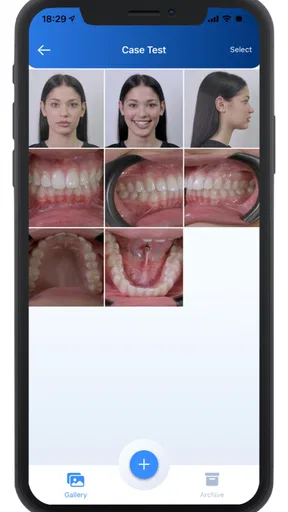
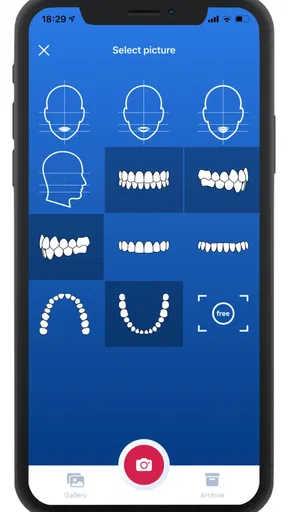
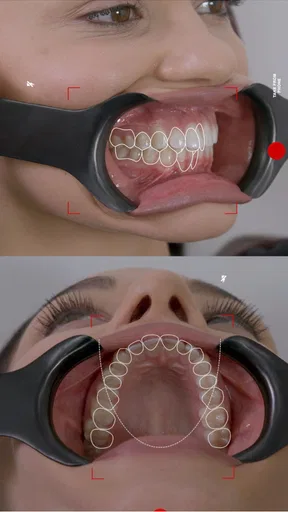
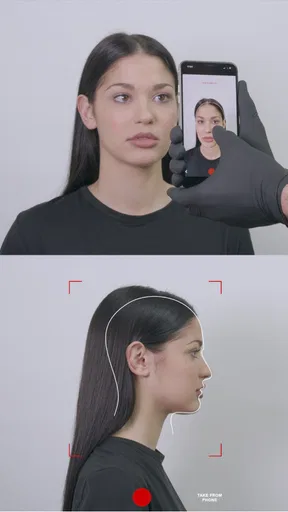
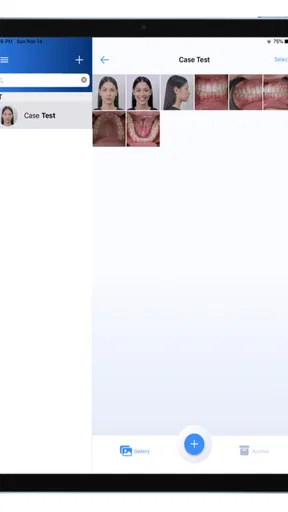
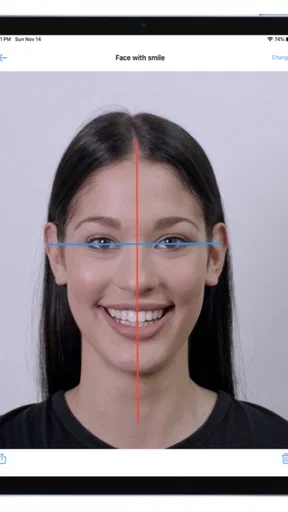
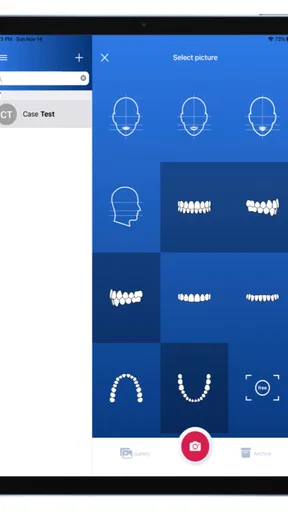
 Analysis by AppCompare
I approached Dental Shooting as a focused medical photography tool rather than a general camera app. Its purpose is straightforward: help dental professionals take clinical photographs and edit them afterward. That narrow goal is useful, but it also changes how I judge it. A dental photo app does not need social filters or creative effects; it needs a calm workflow, readable controls, dependable handling, and enough flexibility for different users and working environments.
Dental Shooting is developed by Dental Shooting SRLs and is available as a free app for Android users. It is rated for Everyone, works from Android 5.0 onward, and the current version is 2.9.10. The app has passed the ten-thousand-install mark, although its average rating is only 1.7 from roughly seventy-five ratings and six written reviews. That public response is important context: the idea is specialized and potentially practical, but the experience may not feel polished or universally dependable.
How Dental Shooting fits into a real dental photography workflow
In a typical appointment, I would use an app like this after deciding that an ordinary phone camera is not enough for the record I want to keep. Dental photography often depends on consistent framing, clear visibility, and images that remain useful when reviewed later. The value is not simply taking a sharp picture. It is creating a visual record that can support consultation, treatment discussion, progress comparison, or communication with another professional.
The most sensible workflow is to prepare the patient and the environment first, then use the app for capture and editing rather than trying to correct every problem afterward. Good lighting, a stable phone position, clean retractors, and a repeatable angle still matter. No editing tool can fully rescue a poorly exposed or badly framed photograph. I found that this is the first important trade-off: the app can organize the photographic task, but it does not replace clinical technique.
The editing side is potentially helpful when a photo needs visual refinement for professional viewing. Cropping can remove distracting areas around the mouth, while adjustments can make the relevant dental region easier to inspect. I would keep edits conservative, however. A clinical image should become clearer, not cosmetically altered. The more aggressively an image is changed, the greater the risk that the result no longer represents what was actually seen.
Readability and navigation during a busy appointment
For me, readability matters more here than it would in a casual camera app. Dental staff may use the application while standing beside a patient, wearing gloves, moving between instruments, or working under strong clinical lighting. Controls that look obvious in a quiet room can become difficult when attention is divided. A useful interface should make the capture path easy to understand and should avoid forcing the user to search through decorative menus.
Because the app is dedicated to dental photography, its focused purpose is an advantage. There is less reason to expect unrelated camera modes, social sharing tools, or entertainment features. That can make the experience easier to learn for someone who only wants a clinical image. At the same time, the low average rating makes me cautious about assuming that every part of the navigation feels smooth. I would test the complete process before using it during a busy clinic session.
Worth Reading Before You Choose

Flipboard Shows What News Apps Must Do Beyond the Feed

Switching to Android Auto Means Rethinking Your Driving Routine

Google Calendar Makes a Crowded Week Easier to Manage

Ludo King Makes the Most of the Minutes Between Plans

Baby Panda World Brings Quick Play to Modern Phones, but Its Game Library Feels Busy

ESPN’s Live Game View Makes Following Close Games Easier
My practical advice is to create a short rehearsal routine. Open the app, locate the capture control, take a test image, find the editing tools, and check how the finished image is handled. Doing this before a patient arrives is especially valuable for assistants or clinicians who do not regularly use medical photography software. If a colleague has to learn the workflow while the appointment is already underway, the app becomes a source of delay rather than a time-saver.
Text size and contrast are also part of usability, even when an app is not marketed as an accessibility tool. A user with reduced vision may need to enlarge the phone display or use system-level visual settings, but those changes can affect how much of the interface fits on screen. I would not assume that every control remains equally comfortable under magnification. A quick test on the actual device is more useful than relying on screenshots or a description.
Motor and sensory considerations for capture and editing
Taking intraoral photographs can already be physically demanding. One hand may hold the phone while the other manages positioning, lighting, or patient comfort. Someone with limited fine motor control, hand tremor, joint pain, or reduced grip strength may find repeated tapping and repositioning tiring. Dental Shooting can be considered helpful only if its capture process does not demand excessive precision or too many rapid actions.
I would use a stable phone grip or a stand whenever the clinical setup allows it. This is not just an image-quality tip. It reduces the amount of force and coordination needed from the person taking the photograph. A stable support can also make the process more inclusive for staff who cannot comfortably hold a phone in one position for long. The trade-off is that a support takes preparation and may not suit every operatory.
Users with limited reach may benefit from arranging the phone, patient chair, and accessories before opening the app. The best workflow is the one that minimizes unnecessary movement after the patient is ready. If the application requires frequent switching between capture and editing, that could be tiring for some users. I would therefore separate the work into two stages where possible: capture a complete set first, then edit once the physical part of the procedure is finished.
Sensory comfort deserves attention too. Bright screens, reflections, and visually dense controls can be uncomfortable for people with light sensitivity or visual processing differences. A dental operatory is already full of intense lighting and reflective surfaces, so screen glare may become a practical problem. Tilting the phone slightly, reducing surrounding reflections, and using a familiar device can help, although these are environmental adjustments rather than special functions of the app.
Audio is not something I would depend on for this workflow. In a clinical setting, spoken prompts may be difficult to hear over equipment or conversation, and a user with hearing loss should not have to rely on sound to know whether a photograph was captured. I would prefer a clear visual confirmation and would verify the image directly after important shots. That habit also protects against blurry images, closed eyes, poor positioning, or an obstructed view.
Situational access in clinics, training, and patient communication
The app may be most useful for dental professionals who want a dedicated place to take and edit photographs without building a workflow from a general camera application. A general camera is familiar and often faster for casual images, but it may not feel designed around dental documentation. Dental Shooting’s specific identity gives it a clearer purpose, which can make it easier to justify in a practice where several people need to follow the same basic process.
A realistic example would be a clinician preparing a before-and-after record for a patient consultation. The assistant could capture the agreed views, check each image immediately, and make restrained edits for presentation. Later, the clinician could use the images to explain the treatment plan in a more concrete way. This can be valuable for patients who understand visual explanations better than technical descriptions, including people who are anxious, unfamiliar with dental terminology, or communicating through an interpreter.
That same scenario highlights an important boundary. The app may support visual communication, but it does not automatically make a consultation accessible. A patient with low vision may need verbal explanation, tactile guidance, or a different format. A patient with cognitive or sensory sensitivities may need more time and a quieter environment. The photograph is only one part of the communication process, and I would never treat the app as a substitute for adapting the appointment itself.
It could also fit teaching situations. A student or newly hired assistant might use it to practice a consistent photography sequence before working independently. The dedicated focus may be less distracting than a full camera suite. Still, supervision remains important because a technically attractive image can be clinically incomplete. Training should cover positioning, consent, privacy, and safe handling of images alongside the app’s controls.
For remote collaboration, I would be careful. A dental photograph may contain sensitive health information, and the app should be used only within the clinic’s approved process for storing or sharing patient material. I would not assume that a free download automatically fits a practice’s privacy requirements. The safe choice is to follow the clinic’s existing rules and confirm where images go before incorporating the application into routine documentation.
Where the experience may create barriers
The clearest concern is the public reception. An average rating of 1.7 is not a minor detail, especially for a tool that may become part of a professional routine. Ratings do not explain every problem, but they do tell me not to recommend installing it and immediately relying on it for important records. I would begin with non-sensitive test images, compare the results with the usual camera workflow, and only then decide whether it is dependable enough for regular use.
The free download also needs to be viewed in context. In-app purchases range from about fifty dollars to around one hundred forty dollars per item. That makes the initial installation easy to try, but the overall cost can become significant if the workflow depends on paid functions. I would identify exactly which tools are available without payment before changing a practice’s routine. For a solo user who only needs occasional dental photographs, a free app with expensive optional items may not be better value than a familiar camera.
Another barrier is device familiarity. The minimum Android requirement is old enough to include a wide variety of phones, but compatibility alone does not guarantee a comfortable experience. Screen size, camera quality, processing speed, and handling all influence the result. A user with a small display may struggle more with editing controls, while someone with a heavier phone may find prolonged one-handed use uncomfortable. Testing on the intended clinic device is essential.
There is also a learning barrier for people who do not regularly take clinical photographs. A specialized app can appear simpler than a general camera, yet dental photography has its own conventions. Users still need to understand positioning, focus, lighting, and consistency. If the app’s editing tools encourage users to fix images instead of retaking them, the workflow may produce records that look acceptable but are less useful for comparison.
Users who need strong accessibility support should be particularly deliberate. I would check whether system font enlargement, display magnification, touch settings, and screen-reader behavior work comfortably with the app before committing to it. I would also ask whether another staff member can complete the capture process if the interface or physical handling is difficult. That is not a criticism of the user; it is a realistic backup plan for a clinical environment where patient care should not depend on one person overcoming an awkward interface.
People who need a full dental record system should also look elsewhere. This app is centered on taking and editing photographs, not on replacing broader clinical software. If the main requirement is appointment management, charting, consent documentation, team access, or structured patient records, a practice-management platform is likely a better foundation. A general camera may also be preferable when speed, familiarity, and device integration matter more than a dental-specific workflow.
What I would check before making it part of daily work
My first check would be repeatability. I would photograph the same subject from the same approximate views on several occasions and see whether the process encourages consistent results. Consistency is more valuable than a dramatic editing effect. If the app makes it easy to crop differently every time, I would establish a clinic rule for framing before asking multiple staff members to use it.
My second check would be the handoff after editing. I would confirm how easily a finished image can be reviewed and moved into the clinic’s normal documentation process, without assuming that the app itself provides a complete record system. A photograph that looks good inside the application but becomes awkward to retrieve later is not a successful clinical workflow. This is one of the less obvious trade-offs with specialized tools: a focused capture experience can still create friction at the storage stage.
My third check would be error recovery. I would deliberately take an unusable photograph, close the app, and repeat the process to see how quickly a user can recover. In practice, patients move, lighting changes, and the first image is not always good enough. A workflow that is easy only when everything goes perfectly will frustrate staff and may encourage them to keep poor images instead of retaking them.
I would also test the app with the people who actually use it, not just the person choosing it. An experienced clinician may understand a control immediately while a new assistant does not. Someone with limited vision or reduced dexterity may notice a problem that other testers miss. Including different users in the trial is the most practical way to judge whether the app supports varied abilities and working styles.
Finally, I would keep the original capture process conservative. I would avoid editing that changes the apparent condition of teeth or soft tissue, maintain a clear distinction between documentation and presentation, and make sure the patient understands how photographs are being used. The app can support a professional image workflow, but clinical responsibility remains with the practice.
My inclusive verdict on Dental Shooting
I see Dental Shooting as a specialized experiment worth testing, not an automatic replacement for a general camera or established dental software. Its strongest point is its clear focus on dental photography and editing. That focus may help a clinic create a more deliberate image routine, especially when staff want something more purpose-built than the phone’s standard camera.
Its weaker side is the uncertainty created by the low public rating, the possibility of paid features becoming important, and the need to verify how comfortably it works for different users. The app is free to install and suitable for Everyone, but those labels do not answer the practical questions that matter in a clinic: Can each staff member read the controls? Can someone with limited hand movement operate it without strain? Can the team handle glare, noise, gloves, and interruptions? Can the resulting images fit safely into the existing documentation process?
I would recommend trying it to a dental professional who wants to explore a dedicated photography workflow and is willing to test it carefully on the clinic’s actual Android device. I would not recommend depending on it immediately for important patient records, and I would skip it if the practice needs a complete clinical management system or guaranteed accessibility support. For users with varied abilities, the best approach is a short supervised trial, device-level accessibility testing, and a backup method that everyone can use.
In my view, the right reason to choose Dental Shooting is its dental-specific focus, not the promise of effortless documentation. It may become useful when paired with good photography habits, clear clinic procedures, and thoughtful support for staff and patients. Without those safeguards, a familiar general camera or a more established professional platform may be the more inclusive and dependable choice.
Pros
- Simple controls make it easy to start playing immediately.
- Short levels suit quick gaming sessions on mobile devices.
- Bright cartoon visuals give the game a playful
- accessible style.
- Progression provides a clear reason to keep completing stages.
- Lighthearted gameplay may appeal to casual players and younger users.
Cons
- Gameplay can feel repetitive after several similar dental-themed levels.
- The cartoon premise may not appeal to players seeking realistic simulations.
- Difficulty or progression may become unbalanced in later stages.
- Frequent ads could interrupt play
- depending on the device and version.
- The game may offer limited depth for users looking for long-term replay value.
FAQs for Dental Shooting
What is Dental Shooting, and how does the game work?
Dental Shooting is a casual mobile game built around a humorous dental-themed shooting concept. During gameplay, you generally aim at targets, objects, or enemies connected to the game’s dentist-style setting and try to complete levels or challenges. Its controls are designed to be easy to understand, making it suitable for short gaming sessions. However, the exact objectives and available modes may vary depending on the version installed.
Is Dental Shooting free to download and play?
Dental Shooting can typically be downloaded without an upfront purchase, but the free version may include advertisements, optional in-app purchases, or both. These purchases could provide extra items, upgrades, cosmetic content, or other gameplay advantages, depending on the developer’s design. Before confirming any payment, review the store listing carefully and check whether parental controls or purchase restrictions are needed on your device.
Does Dental Shooting require an internet connection?
The basic gameplay of Dental Shooting may work without a constant internet connection, which is convenient when playing while traveling or in areas with limited coverage. Nevertheless, an internet connection may still be required for advertisements, downloading additional content, synchronizing progress, receiving updates, or processing purchases. Because offline availability can change between releases, it is best to test the game after installation with Wi-Fi and mobile data disabled.
Is Dental Shooting appropriate for children?
Dental Shooting uses a playful and exaggerated dental theme, but parents should still check the official age rating and content description before allowing children to play. The game may contain cartoon violence, shooting mechanics, advertisements, or optional purchases. Younger players could also encounter external links or promotional content. Reviewing the privacy information and enabling device-level purchase restrictions can help create a safer experience for children.
What permissions and device requirements should I check before installing Dental Shooting?
Before downloading Dental Shooting, check the Google Play Store or Apple App Store listing for its current compatibility requirements, supported operating-system versions, download size, and privacy disclosures. The game may request access related to advertising, analytics, notifications, or purchases, although the exact permissions depend on the platform and release. Make sure your device has enough storage and install updates only from the official store.


